CreatioService

Serve customers faster
with full context and AI support

Manage submissions, SLAs, and omnichannel support in one place. Every agent sees the full history of the customer — and knows what to do next.

Deployment in 6—8 weeks
SLA, routing and escalations without coding
Creatio Level IV Certified Partner
Alex Wilson's customer service dashboard shows a client profile, mood score of 55, active account details, case dynamics chart with case list and assignments, service agreements, and a client interaction summary with recent complaint and troubleshooting information.
“The customer calls, emails, and chats — and each agent sees something different”
Customer Service Manager, B2B
“We learn about an SLA breach after the fact — it's too late to do anything”
COO, Manufacturing Company
“The agent starts from scratch on every request — the customer has to repeat their story every time.”
Chief Operating Officer, Distribution
01 — 360° customer view

Every agent starts with a full context — without asking the customer for a story

Creatio Service maintains a unified customer database with a history of requests, purchases, interactions, and active SLAs. The agent sees everything on one screen before picking up the phone.
  • History of purchases, requests and interactions in a single customer view
  • Segmentation of customers by priority, industry and SLA tiers
  • Link to products, active service agreement and renewal dates
  • Relationship Status Visibility: Customer Value, CSAT, and Churn Risk
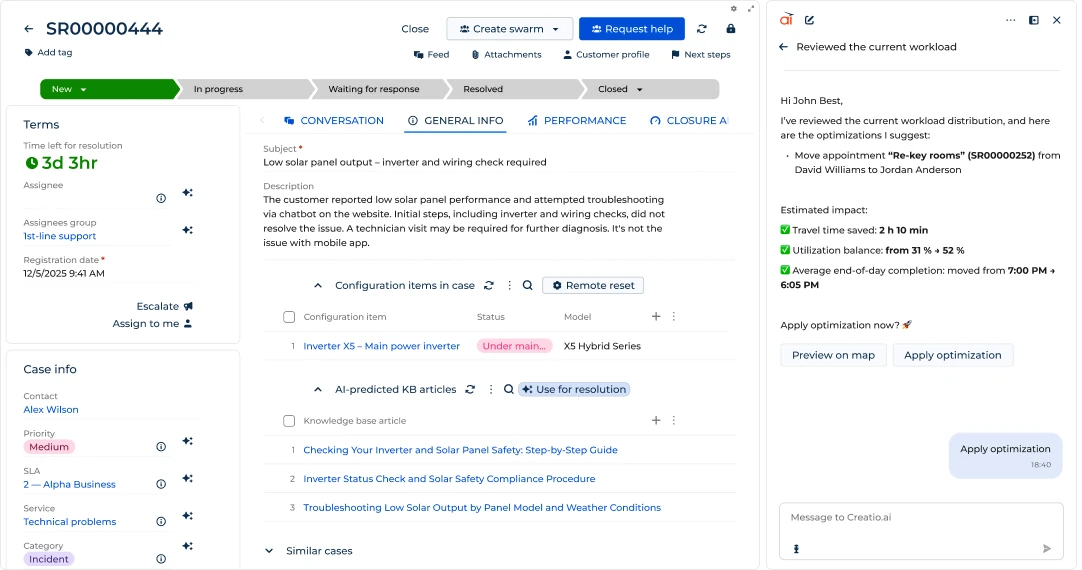
A l'interfaccia di assistenza clienti con ID SR00000444 su un output di panel solare basso richiede una controllo di invertor e cablaggio, la progressione del caso, termini, informazioni del caso, articoli di base di conoscimento AI previsibile e un conversazione chatbot per ottimizzazione del carico.
A customer service dashboard showing an inbox with new and in-progress cases, a chat conversation between Nancy Smith and John Best about a solar panel display issue, and AI-powered troubleshooting steps for a technician.
02 — Multi-channel support

One Agent, Multiple Channels — One Customer Story

Receive and send communications via email, phone, chat, customer portal and WhatsApp directly from Creatio. The history of each contact goes automatically to the customer record — regardless of the channel.

  • Email, phone, chat, WhatsApp and customer portal from one interface
  • Communication history automatically linked to the request record
  • Switch between channels without losing the context of the conversation
  • The client does not know that he has changed the agent - the agent sees the whole story
03 — Application management

From registration to resolution — no manual work or manual routing

Requests from email, phone, chat, and portal are logged automatically. AI prioritizes, selects a service category, and assigns to the right agent in seconds.

  • Automatic registration of requests from all input channels
  • AI-routing: prioritization, service and group classification without manual rules
  • Flexible, no-code configurable workflows in Process Designer
  • Automatic escalations with alert to supervisor before SLA is breached
Dashboard mostra una vista di prestazioni di servizio con grafici includono una grafica di linea di risoluzione planata vs attuale resolutie, le case per donut di servizio, le cartella di scorecard, e tempo di risoluzione media per canale. A customer interaction summary chat is shown on the right discussing issue diagnosis and solutions.
A user support ticket interface showing case SR00000444 on a low solar panel output with steps for resolution and AI optimization suggestions on workload distribution.
04 — Knowledge management

Get the right answer instantly — no need to search through documents

Unified knowledge base with FAQ, specifications and operating procedures. The AI analyzes the content of the active submission and suggests matching articles before the agent starts writing the response.

  • Knowledge base for agents, customers and partners with customizable accesses
  • AI suggests articles matching the content of the active submission
  • Customer portal with self-service: search engine and registration of requests
  • Updating articles without IT — no-code editor available for everyone
05 — Activity management

Every task scheduled — no client without follow-up, supported by AI

The Calendar and Tasks sections in Creatio Service allow agents to organize work and track follow-ups. Supervisors see the workload of the entire team in real time.
AI agents take care of routine tasks so that the team can provide customers with the highest level of service.
  • Calendar with day, week and month view for each agent
  • Submission tasks — context and history at your fingertips
  • Automatic creation of tasks from flows (eg “Call after 3 days”)
  • Team workload view for the supervisor — who has too much, who does not have enough
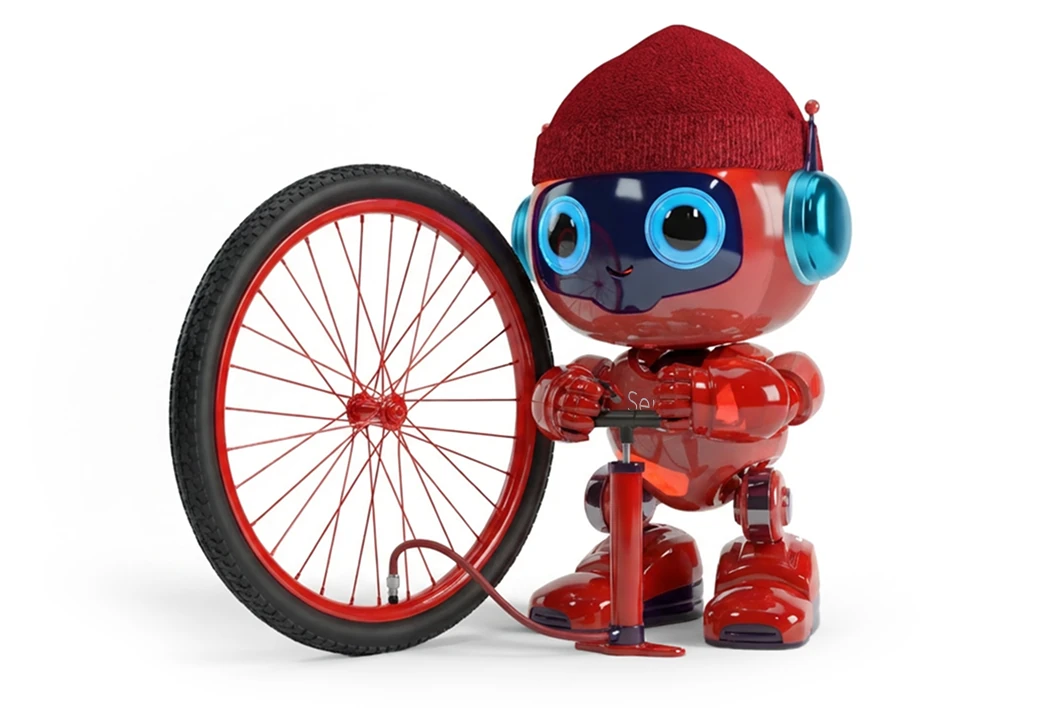
A red robot wearing a red knit cap and blue headphones inflating a large bicycle wheel with a hand pump.
A dashboard of a default service contract showing general info, active and available services with status and categories, plus a client interaction summary with suggestions for improvement of workflows.
06 — SLA Level Management

Every service contract tailored to the customer — and monitored live

The "Services" section stores a central catalog of supported services. The "Service Agreements" section lets you configure different SLA levels per customer, partner, or request priority.

  • Central service catalog with definition of expected response times and solutions
  • Configuration of SLA levels: Premium, Standard, Basic per client or type
  • Automatic notifications before an SLA breach — not after the fact
  • SLA compliance report per client, agent and request type
07 — Unified Service Center

One screen for the agent — the entire service center under control

Customizable request queues (dynamic or static), desktop agent with view of active request and customer history, KPI tracking. Self-service portal for external customers.

  • Dynamic and static queues per team, product or service channel
  • Agent desktop: request+client+SLA+history in one window
  • External customers register requests and track status through the portal
  • Supervisor sees entire queue and agent load live
A dispatch manager board with a list of service tasks on the left, color-coded technician zones on the Atlanta map in the center, and a workload optimization chat panel on the right.
Il dashboard del servizio del cliente visualizzare con grafici per le caso di risoluzione e attualmente soluzioni, caso per tipo di servizio, caso per score, tempo di risoluzione media per canale e un conversazione di chat su soluzione di richiesta di un slow-motion del cliente.
08 — Analytics Effectivelysyou service

Real-time service center visibility

Live analytics on the supervisor's agent desktop. CSAT, FCR, SLA compliance, processing time — all in one dashboard. Identify weak links before they impact customer retention.

  • Real-time KPIs: CSAT, FCR, SLA compliance, sr. time will closeęcia
  • Dashboards for agents, clients and clientsl oopslservice
  • Trend reportsohw — byohWaning week to week, monthsąca per monthąca
  • Alerts for the supervisor in case of deviations from the established norms
09 — AI Tools

Leverage knowledgeable AI agents to deliver exceptional customer service

AI agents take care of routine tasks so that the team can provide customers with the highest level of service.

  • AI agents integrate data from all channels, instantly giving support teams the right context and offering personalized solutions without the need to manually perform steps or switch screens.
  • Detection of similar reports — agents resolve faster, FCR grows
  • ML models trained on historical data from the client system
  • No additional coding — AI ready to use when deployed
A red robot wearing a red hat and blue headphones holding a digital sign showing an SLA countdown timer at 5 minutes 43 seconds with 'On Track' status in a modern office setting.
Hexagonal grid displays logos of various companies and services including Jira, FedEx, Microsoft Teams, Amazon Connect, Hootsuite, Twilio, Cisco Finesse, Avaya, Zoom, Five9, Outlook, yellow.ai, talkdesk, and others.
10 — Creatio Marketplace

Hundreds of ready-made solutions — expansion of the service center without development

Creatio Marketplace offers ready-to-use plugins, templates, connectors, and extensions to accelerate integrations and deployments. You download, configure, run — without writing code.

  • 800+ ready-made solutions: plugins, process templates, connectors
  • Integrations with SAP, Jira, Zendesk, WhatsApp, Microsoft 365 and more
  • Ready-made service process templates for one-click import
  • Expansion of the service center without involving the IT department
Deployment process

From decision to operational service in 6—8 weeks

We start with the key channels and the most urgent processes — the first requests go to the system already during implementation.

1

Analysis and design

We map request types, SLAs, team structure, and service channels. We define routing, priorities and escalation rules — before we configure anything.

Map of ticket types
Matrix SLA per client/type
Routing and Escalation Tree
Catalog of products and categories
2

Configuration and integration

We configure queues, SLAs, routing and omnichannel. We integrate email, phone and chat. We migrate the history of requests from the previous system. First real entries in sprint 2.

Email, phone, chat integration
SLA and Escalation Configuration
Knowledge base — import of articles
Case History Migration
3

Go-live and Adoption

We train agents and supervisors — from queue management to CSAT dashboards. Hypercare for 30 days: we respond to questions and optimize rules based on the first weeks of work.

Training per role (agent, supervisor)
SLA and CSAT dashboards
Calibrating Routing Rules
Hypercare 30 days
findings

What changes after the implementation of Creatio Service

35%
shorter average time
to resolution
avg. Optingo customers
95%+
SLA compliance
after the first month
Post-implementation data
+0.8
increase in CSAT
after implementation (scale 1-5)
Customer research
6—8 weeks
time from kick-off
to go-live
vs. 12–18 months traditionally
For whom

For every role in B2B customer service

Creatio Service responds to the needs of front-line agents, supervisors and management to measure NPS and retention.

Manager/Director of Customer Service
100-1000 employees · B2B
“I learn about the SLA breach from the customer, not from the system. I need alerts before it's too late.”
SLA alerts before a breach, not after
Real-time CSAT and FCR Dashboard
Team Workload and Queue Distribution
Automatic routing eliminates manual allocation
COO/Chief Operating Officer
200-2000 employees
“Customer service is the last department without systemic process management. All by email and phone.”
Standardization of service processes in all branches
Measurable KPIs: SLA, CSAT, FCR, Response Time
Visibility into team load and bottlenecks
Service integration with sales CRM
CEO/Owner
50-500 employees
“I lose customers because of poor service. I don't know which customer is unhappy until he leaves.”
AI detects churn risk before customer leaves
NPS and CSAT — Hard Satisfaction Index
Customer service as a competitive advantage
One system: sales + marketing + service
Start acting

Ready to see how Creatio Service
raises your team's SLA and CSAT?

45-minute demo — we show case management, SLA routing and supervisor dashboards using examples from your industry.

No commitment
Free Demo
We respond in 24h